Multi-tienda
Todas tus tiendas, juntas o una al lado de otra
Llevar más de una tienda Shopify suele significar más de un panel. Conéctalas todas a Margeny, cambia entre ellas o mira el conjunto como un único P&L.
Cómo funciona
Conecta cada tienda con la misma instalación de un clic. Tu resumen gana un selector de tienda: todas combinadas o una a una.
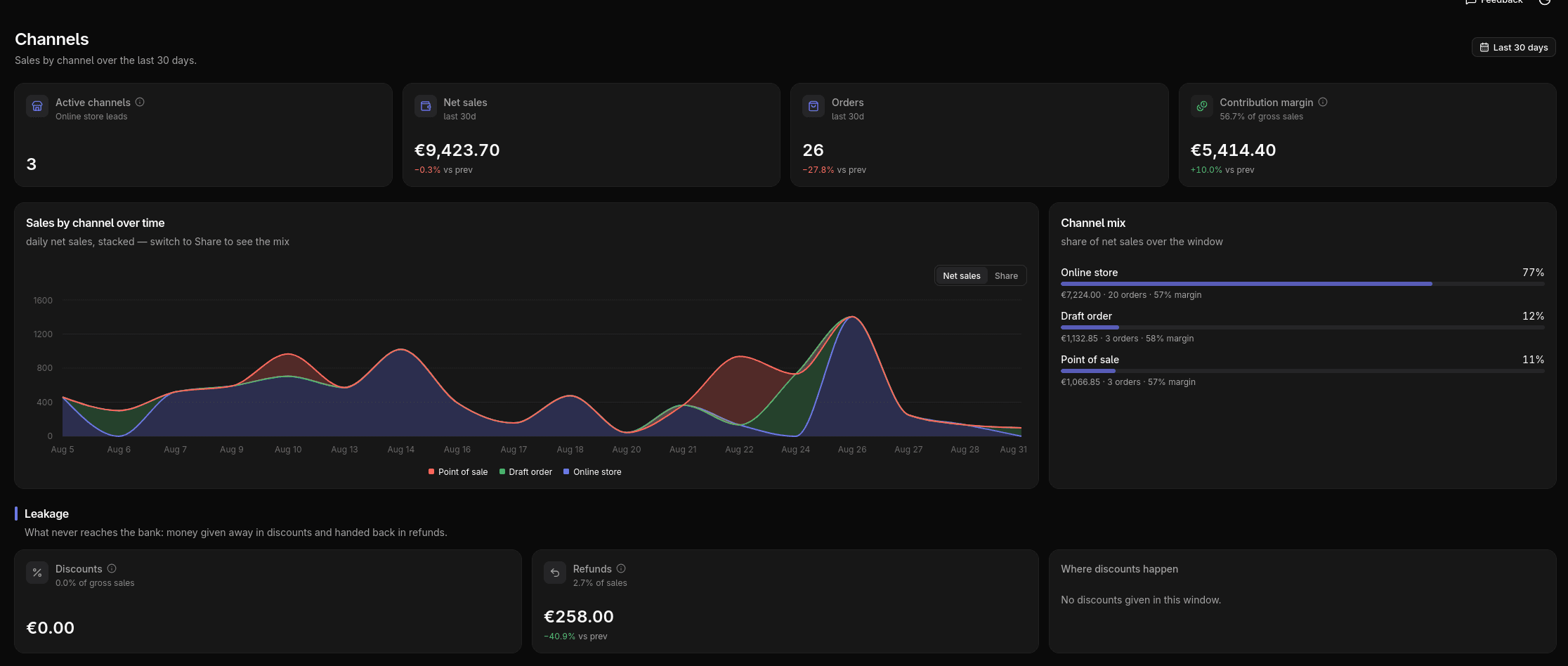
Las métricas diarias llevan tienda, así que ingresos, margen y canales se separan limpio por tienda o se combinan sin contar dos veces.
Los emails semanales de beneficio van igual: una tienda recibe un resumen; varias, una vista combinada más el desglose por tienda.
Qué vas a ver
- Un selector Todas / por tienda en todo el panel
- Ingresos, margen y canales por tienda o combinados
- Un desglose por canal de venta dentro de cada tienda
A tener en cuenta
Varias tiendas requieren el plan Growth o superior; Starter cubre una sola tienda. Lo de nivel cuenta, como el P&L con publicidad, se mantiene combinado en vez de partirse por tienda.
Más funciones
Conoce tu beneficio real esta semana
Conecta tu tienda en minutos. 14 días gratis, sin tarjeta.